Problem: Menu Drop Down tidak mau membuka

Selasa, 19 Juni 2012

Menu Drop Down tidak mau membuka pada moodle karena cache situs moodle anda belum dihapus, coba dengan cara ini :
1. Hapus Cache Theme anda pada tautan http://yourdomain.com/theme/index.php
Jika masih tidak bekerja maka hapus juga cache system anda
2. Hapus cache pada system admin pada link http://yourdomain.com/admin/purgecaches.php
Selamat mencoba, ok.

error dengan pesan "JW_SIG_CFU"

Senin, 14 Mei 2012

I work with simple image gallery and work fine, but appear in the top of my site the message "JW_SIG_CFU" in background color orange.


Solution :
The problem is ok. Is about status of chmod in chache folder, change for 777 and the problem is ok.

Beberapa error dalam install joomla...

Sabtu, 12 Mei 2012

Beberapa kali kita sering mengalami error ketika menginstall joomla ( installer, komponen, modul ataupun template). Biasanya pesan yang muncul adalah :
JInstaller: :Install: Cannot find Joomla XML setup file
Berikut beberapa langkah yang perlu disesuaikan untuk mengatasinya :

  1. Setting php.ini diserver perlu disesuaikan diantaranya : memory_limit = 50M  post_max_size = 10M file_uploads = On upload_max_filesize = 10M  (Letak file php ini tergantung OS server anda masing-masing, di apache ubuntu letaknya di :  /etc/php5/apache2/php.ini
  2. Folder dalam joomla harus kita set Writeable agar saat menginstall berjalan baik. Folder tersebut adalah : tmp, modul, component, template, language.
  3. Jangan Lupa untuk merestart service apache untuk perubahan konfigurasi php.
Selamat berjuang ....

Cloning antar hardisk di linux tanpa bantuan software tambahan

Jumat, 04 Mei 2012


mungkin judul saya kurang tepat, maksud di sini adalah mengunakan software yg sudah include ada di linux jadi tidak perlu repot lagi mau install software atau bikin pakai software khusus.

sebenarnya lahngak ini sudah banyak di jelaskan di internet jadi tulisan ini saya tulis waktu pada saya kondisi kepepet di mana pada saat saya memaintenance warnet saya lupa membawa flashdisk 1 buah pun yg biasa saya gunakan flashdisk itu untuk software cloning saya yaitu clonezilla.
cara ini juga bisa di gunakan untuk menuliskan file .img ke flashdisk atau ke hardisk.
cara menulis file .img ke flash disk atau hardisk.
dd if=/lokasi_file_img/file.img of=/dev/hardisk_flashdisk
contoh:
dd if=/home/sa3o/pfsense.img of=/dev/sdb
kalau cara cloning :
dd if=/dev/hardisk_asal(bisa hardisk komp kita sendiri) of=/dev/hardisk_tujuan
contoh:
dd if=/dev/sda of=/dev/sdb
Sekian :D .

TIPS & TRIK : Webmin Tidak Mendeteksi isc-dhcp-server


Di ubuntu 12.04, webmin tidak mendeteksi adanya isc-dhcp-server. Untuk memperbaiki masalah ini, replace file  /etc/webmin/dhcpd/config dengan isi file sebagai berikut :


start_cmd=/etc/init.d/isc-dhcp-server start
lease_file=/var/lib/dhcp/dhcpd.leases
dhcpd_path=/usr/sbin/dhcpd
display_max=100
group_name=0
lease_tz=0
lease_sort=0
interfaces_type=debian
show_mac=0
stop_cmd=/etc/init.d/isc-dhcp-server stop
dhcpd_conf=/etc/dhcp/dhcpd.conf
pid_file=/var/run/dhcpd.pid
restart_cmd=/etc/init.d/isc-dhcp-server restart
desc_name=0
show_ip=0
dhcpd_nocols=5
add_file=
hostnet_list=
version=
dhcpd_version=4.1.1
dhcpd_size=700320
dhcpd_mtime=1279996769


Setelah isi file /etc/webmin/dhcpd/config Anda edit, refresh modul webmin, dan muncullah DHCP di modul Server.

source : klik

Menampilkan Google Maps di Joomla

Jumat, 27 April 2012

1. Pada Google Maps pilih lokasi yang dituju.
2. Klik icon Link / Tautan.
3. Pilih Source-nya saja untuk dipasang pada wrapper.


Disable Autoconfiguration IPv4 Address

Jumat, 09 Maret 2012


How to disable Autoconfiguration IPv4 Address

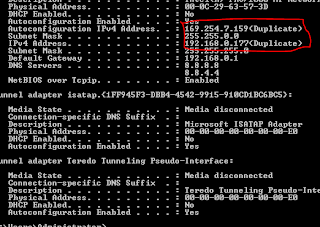
Sometime you setup windows server 2008 to vmware using LAN or wifi, you chose Bridge mode to share internet connections between host and virtual machine may be cause of issues with internet connection at virtual machine. They can not connect to the internet or appear a message likes "conflict IP address"

Enter: Run > cmd > ipconfig /all

You may see the following issues:


or:

Ethernet adapter Local Area Connection:

Connection-specific DNS Suffix . :
Description . . . . . . . . . . . : Intel(R) 82567LM-3 Gigabit Network Connection
Physical Address. . . . . . . . . : 00-23-24-08-30-57
DHCP Enabled. . . . . . . . . . . : No
Autoconfiguration Enabled . . . . : Yes
Link-local IPv6 Address . . . . . : fe80::8508:6cb9:5112:f8c9 (Preferred)
Autoconfiguration IPv4 Address. . : 169.254.248.201(Preferred)
Subnet Mask . . . . . . . . . . . : 255.255.0.0

IPv4 Address. . . . . . . . . . . : 192.168.1.136(Duplicate)
Subnet Mask . . . . . . . . . . . : 255.255.255.0
Default Gateway . . . . . . . . . : 192.168.1.1
DNS Servers . . . . . . . . . . . : 192.168.1.1
NetBIOS over Tcpip. . . . . . . . : Enabled

To fix it, enter these from Command Prompt:

C:\Users\lyngtinh> netsh interface ipv4 show inter

result as:

Idx Met MTU State Name
--- ---------- ---------- ------------ ---------------------------
1 50 4294967295 connected Loopback Pseudo-Interface 1
11 10 1500 connected Local Area Connection 

11: <=Keep it in mind

Next run this command:

C:\Users\lyngtinh>netsh interface ipv4 set interface 11 dadtransmits=0 store=persistent

Next, enter
Run > services.msc > disable DHCP Client service

Final, restart your server.

Good luck!
lyngtinh
Source : http://lyngtinh.blogspot.com